1
Describe or upload
Start with a text prompt, a reference image, or multiple views to guide what the Text 3D AI engine should build.
 Text3D.ai
Sign in or create your account to generate and manage your AI 3D models.
By continuing, you agree to our Terms and Privacy Policy.
Turn text prompts and images into downloadable 3D models for games, product concepts, 3D printing, AR, and creative projects. Preview, refine, and export GLB, OBJ, FBX, STL, PLY, USDZ, and 3MF files.
This model is designed for subscribers. Upgrade your plan to unlock higher-quality 3D generation and advanced model options.
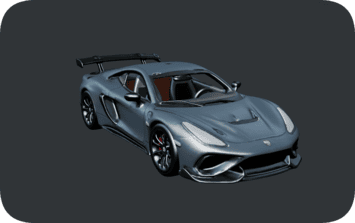
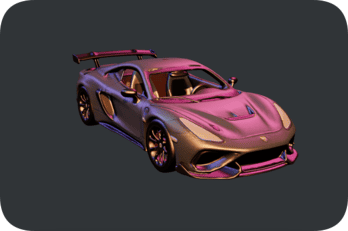
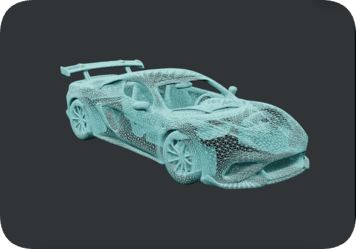
Turn a text prompt into a downloadable 3D model for games, product concepts, AR previews, and creative projects. With Text3D.ai V3.0, creators can generate a textured 3D asset, review it in a 360-degree model viewer, test lighting presets, inspect the wireframe mesh, and prepare the result for export.
"Futuristic off-road exploration vehicle, gray armored shell, oversized all-terrain tires, roof rack, rugged sci-fi proportions, clean hard-surface details."
Text3D.ai keeps the text to 3D workflow simple: describe or upload, generate the model, then preview and export your asset for real 3D pipelines.
Start with a text prompt, a reference image, or multiple views to guide what the Text 3D AI engine should build.
Choose a model version and the AI 3D model generator creates geometry, shape, and surface detail that matches your asset.
Inspect the result, apply optional tools, and export GLB, OBJ, FBX, STL, PLY, USDZ, or 3MF files for your project.
Pick the input that fits your idea or reference. Every mode in Text3D.ai produces a downloadable 3D model you can refine and export.
Turn a written prompt into a 3D model for games, product ideas, 3D printing, AR, and creative concepts — no modeling skills needed.
Try Text to 3DUpload a reference image and create a 3D asset based on the main object, product, character, or concept in the picture.
Try Image to 3DCombine several reference angles to help the model stay consistent when a single image is not enough detail.
Try Multiview to 3DTeams across the United States use Text3D.ai to generate 3D models from text and images — turning ideas into production-ready assets faster.
Generate characters, props, weapons, and environment assets for Unity, Unreal, and indie game pipelines.
Spin up product concepts and 3D mockups from a prompt to explore form and presentation early.
Create STL and 3MF models, repair geometry, and estimate volume before sending a print.
Export USDZ and GLB assets for AR previews, web 3D viewers, and immersive experiences.
Help students and teachers turn ideas into 3D models for lessons, projects, and classroom printing.
Build interactive 3D product views and configurators that boost engagement and conversions.
Kickstart props, set dressing, and stylized models for previz, motion, and 3D scenes.
Generate eye-catching 3D visuals and renders for ads, social posts, and brand campaigns.
Text3D.ai is more than a text to 3D AI generator. It also helps you render, convert, texture, repair, and prepare 3D assets for real production.
Turn 3D assets into polished render images for product previews, game thumbnails, portfolios, and asset detail pages. Use clean lighting, camera-friendly composition, and shareable 3D visuals straight from Text3D.ai.
Create 3D Renders →Convert GLB, OBJ, FBX, STL, PLY, USDZ, and 3MF files for web viewers, game engines, 3D printing, AR, animation, and design software. Keep your 3D workflow flexible long after generation.
Convert 3D Models →Use text prompts or reference images to create and enhance textures for generated or uploaded 3D models. Make plain geometry look complete, stylized, and production-ready with the AI 3D texture generator.
Generate 3D Textures →Fix common 3D model issues such as holes, broken geometry, non-manifold edges, and export problems before printing, rendering, conversion, or download — so your assets are clean and ready to use.
Repair a 3D Model →Estimate volume and surface area for 3D printing, physical products, material planning, and cost estimation. A practical tool for makers, designers, and anyone preparing print-ready 3D models.
Calculate 3D Volume →Reach for these supporting tools when your asset needs animation, remeshing, segmentation, or optimized texture maps.
Text3D.ai pairs fast text-to-3D and image-to-3D generation with the practical tools you need to take an asset from idea to export.
Generate a textured 3D mesh from a single prompt in seconds with the free V1.0 model, then scale up to higher-fidelity geometry when you need it.
Start from text, a single reference image, or multiple views. Text to 3D, Image to 3D, and Multiview to 3D cover the way you actually work.
Choose PBR materials, detailed geometry, and quad meshes built for editing in Blender, ZBrush, Unity, and Unreal Engine.
Download GLB, OBJ, FBX, STL, PLY, USDZ, and 3MF for web, games, AR, animation, and 3D printing — or convert between them anytime.
Render, retexture, remesh, repair, segment, and calculate volume — a full toolkit so a generated asset is genuinely ready to use.
The Text 3D AI workflow is prompt-first and beginner-friendly, while still giving pros the controls they expect for refined results.
Text3D.ai generates assets you can download and use right away. Export to the format your engine, slicer, or design tool expects — or convert between them with the built-in 3D model converter.
Common questions about the Text3D.ai text to 3D AI generator, supported formats, pricing, and 3D workflows.
Text3D.ai is a text to 3D AI generator and 3D asset workspace. It turns a text prompt or a reference image into a downloadable 3D model, then lets you preview, refine, texture, convert, and export it for real 3D workflows.
Describe the object, character, prop, product, or scene you want, choose a model version, and Text3D.ai generates the geometry, shape, and surface detail. You then preview the result and export a 3D model file in GLB, OBJ, FBX, STL, PLY, USDZ, or 3MF.
Yes. The Text3D.ai V1.0 model lets free users generate a textured 3D mesh from a text prompt in seconds. Higher-quality models with PBR materials, detailed geometry, and quad meshes are available on paid plans.
Yes — Text3D.ai is free to use forever. Every free member receives free credits, so you can generate 3D models with the V1.0 model and use features such as the 3D viewer and sharing at no cost. Your free credits refill on a rolling 24-hour cycle rather than by calendar day: they do not reset at midnight. Instead, once you use up your free credits on a 3D generation, they recover 24 hours after that point.
Yes. Image to 3D lets you upload a clear reference image and create a 3D asset based on the main subject. Multiview to 3D uses several reference angles for a more consistent model when one image is not enough.
Creators use Text3D.ai to generate game assets, characters, props, vehicles, weapons, environments, product concepts, collectibles, AR objects, and 3D printing models from text or images.
Text3D.ai supports the common 3D formats GLB, OBJ, FBX, STL, PLY, USDZ, and 3MF, so generated assets work with web viewers, game engines, 3D printing slicers, AR, animation, and design software.
You can export STL and 3MF for 3D printing, and use the 3D model repair tool and volume calculator to fix geometry issues and estimate volume, surface area, and material before you print.
If a generation fails and no usable 3D asset is created, the credits used for that failed generation are automatically returned to your account, so you can try again with a revised prompt or a clearer reference image.
Monthly members receive commercial usage rights for generated 3D assets. Annual members also receive commercial usage rights and can download a separate commercial authorization license for each individual 3D asset.
Text3D.ai is built for game developers, 3D artists, product and industrial designers, 3D printing makers, AR and VR creators, educators, marketers, and indie creators who need fast, downloadable 3D models from text or images.
No. The Text 3D AI workflow is prompt-first, so you can describe what you want in plain language. Optional tools for texturing, remeshing, repair, and conversion are there when you want more control.
Describe it in a sentence or drop in a reference image. Text3D.ai generates a downloadable 3D model in seconds — no 3D modeling experience required.
Start Creating Free